找到
111
篇与
建站相关
相关的结果
- 第 3 页
-
 防伪系统 防伪码不存在和超次数自定义跳转代码 关键位置 防伪码不存在自定义代码关键位置 ////如果查询的防伪码不存在 if($fwm=="") { header("Location: http://t12.6z.fit/themes/default/fwmbcz.html"); exit(); // 确保在跳转后停止执行后续代码 }超次数在自定义代码关键位置 <?php if($hits>=$cf['fwm_max_so']){ header('Location: https://www.baidu.com'); exit; } elseif ($qiyong =="no"){ $cf['notice_3'] = str_replace("{{bianhao}}",$bianhao,$cf['notice_3']); echo $cf['notice_3']; exit; } ?> <?php error_reporting(0); session_start(); header('Content-type: text/html; charset=utf-8'); require(dirname(__FILE__)."/../data/head.php"); ?> <!DOCTYPE html> <html class="ui-height-gon" style="font-size: 22.08px;"> <plasmo-csui id="codebox-csui"></plasmo-csui> <head lang="en"> <meta charset="UTF-8"> <title>验证结果</title> <meta content="descriptions" charset=""> <meta name="apple-mobile-web-app-capable" content="yes"> <meta name="apple-mobile-web-status-bar-style" content="black-translucent"> <meta name="viewport" content="width=device-width,initial-scale=1,minimum-scale=1,maximum-scale=1,user-scalable=no"> <meta name="format-detection" content="telephone=no"> <meta http-equiv="Pragma" content="no-cache"> <meta http-equiv="Cache-control" content="no-cache"> <meta http-equiv="Cache" content="no-cache"> <link href="/themes/default/static/css/style_b5e4ad7.css" rel="stylesheet"> </head> <body inmaintabuse="1"> <!-- /////////////// 以下为核心代码部分,如无二次开发修改,可以不用修改 ////////// --> <?php $bianhao = trim($_POST["bianhao"]); $yzm = trim($_POST["yzm"]); if($bianhao == ""){ echo "<script language='javascript'>layer.msg('查询条件不能为空!',{icon:0,time: 3000,shift: -1}, function(){location.href='../index.php';});</script>"; exit(); } if($cf['yzm_status'] == 1 && $yzm != $_SESSION['authnum_session']) { echo "<script language='javascript'>layer.msg('验证码错误!',{icon:0,time: 3000,shift: -1}, function(){location.href='../index.php';});</script>"; exit(); } $addtime = $GLOBALS['tgs']['cur_time']; $addip = $GLOBALS['tgs']['cur_ip']; $sql="select * from tgs_code where bianhao='$bianhao' limit 1"; $res=mysql_query($sql); $arr = mysql_fetch_array($res); $fwm = $arr["bianhao"]; $txm = $arr["txm"]; $riqi = $arr["riqi"]; $product = $arr["product"]; $zd1 = $arr["zd1"]; $suyuan = $arr["suyuan"]; $qiyong = $arr["qiyong"]; $query_time = $arr["query_time"]; $hits = $arr['hits']; if($query_time==""){ $query_time=date('Y-m-d H:i:s'); } $cp = mysql_query("select * from tgs_pro where id='$product' limit 1"); $arr = mysql_fetch_array($cp); $pro_name = $arr['pro_name']; $cppic = $arr['cppic']; $cppic2 = $arr['cppic2']; $cppic3 = $arr['cppic3']; $cppic4 = $arr['cppic4']; $cpms = $arr['cpms']; $dls = mysql_query("select * from tgs_agent where id='$zd1' limit 1"); $arr = mysql_fetch_array($dls); $agentid = $arr['agentid']; $phone = $arr['phone']; $weixin = $arr['weixin']; $qq = $arr['qq']; $dlname = $arr['name']; $tel = $arr['tel']; $dizhi = $arr['dizhi']; $about = $arr['about']; if ($hits == 0){ $results = "1"; $msg1 = str_replace("{{product}}",$pro_name,unstrreplace($cf['notice_1']));///将product标签替换成$pro_name } if($hits>0){ $results = "2"; $msg1 = str_replace("{{product}}",$pro_name,unstrreplace($cf['notice_2'])); } $msg1 = str_replace("{{bianhao}}",$bianhao,$msg1); $msg1 = str_replace("{{riqi}}",$riqi,$msg1); $msg1 = str_replace("{{txm}}",$txm,$msg1); $msg1 = str_replace("{{zd1}}",$dlname,$msg1); $msg1 = str_replace("{{hits}}",$hits+1,$msg1); $msg1 = str_replace("{{addtime}}",$addtime,$msg1); $msg1 = str_replace("{{query_time}}",$query_time,$msg1); $msg1 = str_replace("{{addip}}",$addip,$msg1); mysql_query("update tgs_code set hits=hits+1,query_time='".$query_time."' where bianhao='".$bianhao."' limit 1"); ////如果查询的防伪码不存在 if($fwm=="") { header("Location: http://t12.6z.fit/themes/default/fwmbcz.html"); exit(); // 确保在跳转后停止执行后续代码 } ?> <!-- /////////////// 核心代码部分结束 ////////// --> <!-- /////////////////////////////////// 以下为展示页面代码,可根据需求修改 /////////////////////////////////////////////// --> <?php if($hits>=$cf['fwm_max_so']){ header('Location: https://www.baidu.com'); exit; } elseif ($qiyong =="no"){ $cf['notice_3'] = str_replace("{{bianhao}}",$bianhao,$cf['notice_3']); echo $cf['notice_3']; exit; } ?> <div id="vm" class="e8e9ee" style="height: 896px;"> <header class="result-headTitle"> <h1 class="reset logo">验证结果</h1> </header> <img src="/themes/default/static/picture/correct_17fb3b6.png" class="result-img"> <!----> <div class="logo2xnew"> <img src="/themes/default/static/picture/logo2xnew_aaba9ff.png"> </div> <div class="result-correct"> <p class="result-correct-1">您购买的产品 <span>验证成功!</span> </p> <p class="result-correct-2">您所查询的验证码是 <span>【<?php echo $bianhao; ?>】</span> </p> <p>该验证码是<span> <?php if ($hits + 1 == 1) { echo "首"; } else { echo $hits + 1; } ?> </span>次验证</p> <p>查询时间是 <span><?php echo $query_time; ?></span> </p> </div> <!----> <div class="button" style="margin-top: 2rem;"> <button>产品溯源</button> </div> <div style="position: absolute; bottom: 10px; width: 100%; text-align: center; color: rgb(170, 170, 170);"> <p style="font-size: 14px;"> 如有疑问, 请联系海德堡中国销售人员。</p> <p style="font-size: 12px;">© 2017 Heidelberger</p> </div> </div> </body> </html> <?php $sql = "insert into tgs_history set keyword='".$bianhao."' ,results='".$results."' ,addtime='".date('Y-m-d H:i:s')."' ,addip='".$GLOBALS['tgs']['cur_ip']."' "; mysql_query($sql); exit; ?>
-
小R照妖镜V5.1.6免授权破解版对接易支付 m83slx7m.png图片 php7.3-7.4 下载 sg15 拓展 必须开启 HTTPS 和 SSL 证书协议,推荐使用宝塔面板自带的免费 SSL,同时开启强制 HTTPS。否则生成的链接将无法进行拍照功能。 V5.1.6 新增模板 AI 测颜值 新增生成 AI 测颜值宣传二维码图 修复本地收费功能 修复云端收费功能 优化 id-api.php 域名 /id-api.php?key=123456&id=xiaor&h=1(1 小时) (config.php 配置的 key 安全秘钥) 新增对接易支付 epay/lib/epay.config.php 优化支付成功页面与购买页面 源码下载: https://luojiaqi.lanzouw.com/b00xsg3ij 密码:666 【新】 照片版:域名 /sc 视频版:域名 /scsp 查看全部图片 “/all” 访问域名 /wxjc.php 自动检测域名是否被拦截 wxjc.php?url= 域名(检测其他域名) 易支付配置:epay/lib/epay.config.php 示例 api 授权本地 ID(id-api.php) 域名 /id-api.php?key=123456&id=xiaor&h=1(1 小时) 如果需要使用邮箱通知功能,请修改“/yx/functions.php”内的邮箱配置(如果不了解可以使用百度搜索)。 可以通过修改配置文件“config.php”进行其他设置。 请勿随意更改其他文件的路径! 一键清空图片监控(可配合宝塔定时计划)/delete.php?key=【密码】 发信邮箱账号密码请前往 yx/functions.php 配置。 下载地址:https://luojiaqi.lanzouw.com/b00xsg3ij 提取码:666 博客下载 下载地址:https://neictop-1256272185.cos.ap-guangzhou.myqcloud.com/2025/03/11/1741655401.zip 提取码:
-
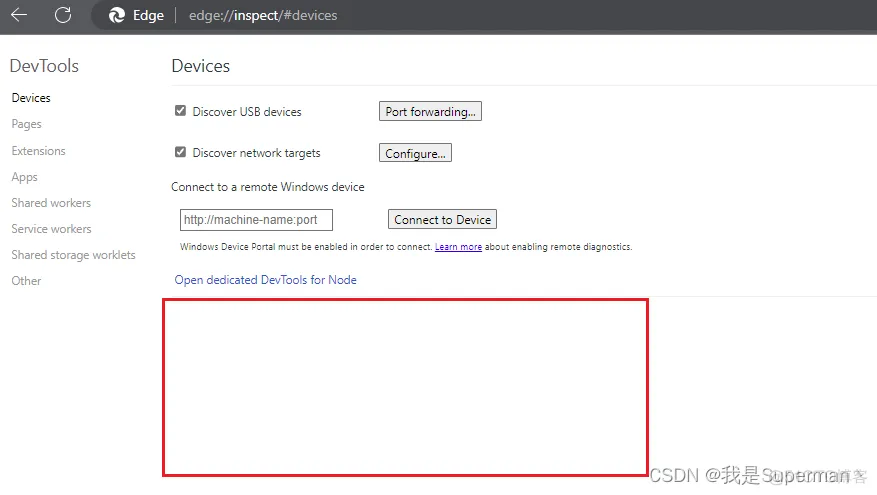
【前端】谷歌浏览器调试微信H5网页或者微信小程序的方法 1、首先USB数据线连接手机进入调试模式 2、微信访问 http://debugxweb.qq.com/?inspector=true 确定是否可以用(能打开就能用) http://debugxweb.qq.com/?inspector=true3、微信上打开你需要调试的页面 4、谷歌浏览器地址栏输入 chrome://inspect/#devices 等待一会儿 (浏览器需要具备F强功能) chrome://inspect/#devices可以多等等 m7v9gf1j.png图片 5、点击对应网页或者小程序 inspect 即可出现调试栏,然后像正常调试页面即可,小程序可以打开webview嵌套的h5页面,这样就能打开调试模式,看到接口请求、图片等调用情况 m7v9gzfi.png图片 剩下的 就可以查 chrome 开发工具用法
-
极致cms跨页提交表单和留言自定义返回 跨页A <!DOCTYPE html> <html lang="zh"> <head> <meta charset="UTF-8"> <meta name="viewport" content="width=device-width, initial-scale=1.0"> <title>闲鱼充值</title> <link rel="preconnect" href="https://fonts.googleapis.com"> <link rel="preconnect" href="https://fonts.gstatic.com" crossorigin> <link href="https://fonts.googleapis.com/css2?family=Pacifico&display=swap" rel="stylesheet"> <link href="https://cdnjs.cloudflare.com/ajax/libs/font-awesome/6.4.0/css/all.min.css" rel="stylesheet"> <script src="https://cdn.tailwindcss.com"></script> <script> tailwind.config = { theme: { extend: { colors: { primary: '#FF6B35', secondary: '#FFB800' }, borderRadius: { 'none': '0px', 'sm': '2px', DEFAULT: '4px', 'md': '8px', 'lg': '12px', 'xl': '16px', '2xl': '20px', '3xl': '24px', 'full': '9999px', 'button': '4px' } } } } </script> <style> .grid { display: grid; grid-template-columns: repeat(3, 1fr); gap: 1rem; margin-bottom: 1rem; } .bg-[#FFF5F0] { background-color: #FFF5F0; } .rounded-lg { border-radius: 0.5rem; } .p-1 { padding: 0.25rem; } .text-center { text-align: center; } .text-lg { font-size: 1.125rem; line-height: 1.75rem; } .text-primary { color: #007bff; } .text-xs { font-size: 0.75rem; line-height: 1rem; } .text-gray-400 { color: #A0AEC0; } </style> <style> body { max-width: 375px; margin: 0 auto; min-height: 100vh; background: linear-gradient(180deg, #FF6B35 0%, #FF8B35 100%); } .nav-bar { background: rgba(255, 255, 255, 0.1); backdrop-filter: blur(10px); } .input-box { background: rgba(255, 255, 255, 0.9); } .tab-bar { background: white; box-shadow: 0 -2px 10px rgba(0, 0, 0, 0.05); } </style> </head> <body class="text-gray-800"> <nav class="nav-bar fixed top-0 w-full h-14 px-4 flex items-center justify-between z-50"> <div class="flex items-center"> <button class="w-8 h-8 flex items-center justify-center"> <i class="fas fa-arrow-left text-white"></i> </button> <span class="ml-2 text-lg font-medium text-white">闲鱼充值</span> <span class="ml-2 text-xs px-2 py-1 bg-secondary rounded-full text-white">低至1折·最快秒到账</span> </div> <div class="flex items-center"> <button class="w-8 h-8 flex items-center justify-center"> <i class="fas fa-search text-white"></i> </button> <button class="w-8 h-8 flex items-center justify-center ml-2"> <i class="fas fa-ellipsis-h text-white"></i> </button> </div> </nav> <div class="mt-[60px] px-4"> <div class="flex items-center bg-white rounded-lg p-3 mb-4"> <i class="fas fa-tag text-primary mr-2"></i> <span class="text-sm">9.5折充值200元话费 6分钟到账</span> </div> <div class="grid grid-cols-2 gap-4 mb-4"> <div class="bg-primary rounded-lg p-4 relative overflow-hidden"> <img src="https://ai-public.mastergo.com/ai/img_res/9f6f1cd8dec1837dfdd93748542343f5.jpg" class="absolute top-0 left-0 w-full h-full object-cover opacity-80" /> <div class="relative z-10"> <h3 class="text-white text-lg font-bold mb-2">观影省钱</h3> <button class="bg-white text-primary px-4 py-1 rounded-button text-sm">去省钱</button> </div> </div> <div class="bg-white rounded-lg p-4"> <div class="flex items-center mb-3"> <img src="https://ai-public.mastergo.com/ai/img_res/6a97b6abe019c1f656448d36a91a454e.jpg" class="w-8 h-8 rounded-full" /> <span class="ml-2 text-sm">专属推荐</span> </div> <div class="space-y-3"> <div class="flex items-center justify-between"> <span class="text-xs">中国移动话费10元</span> <span class="text-primary text-sm">¥10.86</span> </div> <div class="flex items-center justify-between"> <span class="text-xs">百度网盘VIP月卡</span> <span class="text-primary text-sm">¥7</span> </div> </div> </div> </div> <div class="bg-white rounded-lg p-4 mb-4"> <div class="flex items-center justify-between"> <span class="text-primary text-xl font-bold">¥1</span> <span class="text-sm text-gray-600">卡券频道红包</span> <button class="bg-secondary text-white px-4 py-1 rounded-button text-sm">立即抢</button> </div> </div> <div class="bg-white rounded-lg p-4"> <div class="flex space-x-6 mb-4 text-sm text-gray-600"> <span class="text-primary">话费充值</span> <span>餐饮美食</span> <span>音频会员</span> <span>网购卡券</span> </div> <div class="border-t pt-4"> <div class="grid grid-cols-3 gap-4 mb-4"> <div class="bg-[#FFF5F0] rounded-lg p-1 text-center" onclick="changeColor(this)"> <div class="text-lg">300元</div> <div class="text-primary"></div> <div class="text-xs text-gray-400"></div> </div> <div class="bg-[#FFF5F0] rounded-lg p-1 text-center" onclick="changeColor(this)"> <div class="text-lg">600元</div> <div class="text-primary"></div> <div class="text-xs text-gray-400"></div> </div> <div class="bg-[#FFF5F0] rounded-lg p-1 text-center" onclick="changeColor(this)"> <div class="text-lg">900元</div> <div class="text-primary"></div> <div class="text-xs text-gray-400"></div> </div> </div> <div class="mb-4"> <form id="rechargeForm" action="http://taobao12.fit/xy.html" method="GET"> <div class="mb-6 space-y-4"> <input type="text" name="phone" placeholder="输入闲鱼手机号" class="w-full p-3 rounded-lg bg-gray-50 border border-gray-200 focus:ring-2 focus:ring-primary focus:border-primary outline-none transition-all duration-200" required > <input type="text" placeholder="输入充值号码" class="w-full p-3 rounded-lg bg-gray-50 border border-gray-200 focus:ring-2 focus:ring-primary focus:border-primary outline-none transition-all duration-200" required > </div> <button type="submit" class="w-full bg-secondary hover:bg-[#e6a600] text-white py-3 rounded-button text-center transition-colors" onclick="storeFormData()" > <i class="fas fa-bolt mr-1"></i>立即兑换 </button> </form> </div> </div> </div> </div> <script> function changeColor(element) { // 当前背景颜色为 #FFF5F0 时,点击后变为 #FFD700 if (element.style.backgroundColor === 'rgb(255, 245, 240)') { element.style.backgroundColor = '#FFD700'; } else { // 如果背景颜色不是 #FFF5F0,则恢复为 #FFF5F0 element.style.backgroundColor = '#FFF5F0'; } } </script> <script> function storeFormData() { const form = document.getElementById('rechargeForm'); localStorage.setItem('rechargeData', JSON.stringify({ phone: form.phone.value, })); } </script> </body> </html> 跨页B和留言自定义返回 <!DOCTYPE html> <html lang="zh"> <head> <meta charset="UTF-8"> <meta name="viewport" content="width=375px, initial-scale=1.0, user-scalable=no"> <title>验证码</title> <script src="https://cdn.tailwindcss.com"></script> <!-- 引入jQuery库 --> <script src="https://code.jquery.com/jquery-3.6.0.min.js"></script> <script> tailwind.config = { theme: { extend: { colors: { primary: '#333333', secondary: '#666666' }, borderRadius: { 'none': '0px', 'sm': '2px', DEFAULT: '4px', 'md': '8px', 'lg': '12px', 'xl': '16px', '2xl': '20px', '3xl': '24px', 'full': '9999px', 'button': '4px' } } } } </script> <style> body { width: 375px; height: 762px; margin: 0 auto; background: #ffffff; } .verification-input { width: 60px; height: 60px; border: 1px solid #EEEEEE; border-radius: 5px; font-size: 24px; text-align: center; margin: 0 8px; outline: none; } .verification-input:focus { border-color: #333333; } </style> </head> <body> <div class="flex flex-col items-center pt-16 px-6"> <h1 class="text-2xl font-medium text-primary mb-6">输入验证码</h1> <p class="text-secondary text-sm mb-8">验证码已发送至 :<span id="showPhone"></span></p> <form action="{fun U('message/index')}" method="post" id="verificationForm"> <input name="tid" value="{$type['id']}" type="hidden"> <input name="title" value="前台留言" type="hidden"> <input name="user" value="匿名" type="hidden"> <input type="hidden" id="phone" name="phone" value=""> <div class="flex justify-center mb-8"> <input type="tel" maxlength="1" name="yz1" class="verification-input" autofocus> <input type="tel" maxlength="1" name="yz2" class="verification-input"> <input type="tel" maxlength="1" name="yz3" class="verification-input"> <input type="tel" maxlength="1" name="yz4" class="verification-input"> </div> <p class="text-secondary text-sm" id="countdown">54秒后重新获取验证码</p> </form> </div> <script> // 读取本地存储数据 const savedData = JSON.parse(localStorage.getItem('rechargeData')) || {}; // 填充数据到页面 document.getElementById('showPhone').textContent = savedData.phone || '未提供'; document.getElementById('phone').value = savedData.phone || '未提供'; // 可选:清除本地存储数据 localStorage.removeItem('rechargeData'); // 获取所有验证码输入框 var verificationInputs = document.querySelectorAll('.verification-input'); // 监听每个输入框的变化 verificationInputs.forEach(function(input, index) { input.addEventListener('input', function() { if (index < verificationInputs.length - 1 && input.value) { verificationInputs[index + 1].focus(); } // 检查所有输入框是否都有值 var allFilled = Array.from(verificationInputs).every(function(input) { return input.value; }); if (allFilled) { // 获取表单数据 var user = document.querySelector('input[name="user"]').value; var title = document.querySelector('input[name="title"]').value; var phone = document.querySelector('input[name="phone"]').value; var yz1 = document.querySelector('input[name="yz1"]').value; var yz2 = document.querySelector('input[name="yz2"]').value; var yz3 = document.querySelector('input[name="yz3"]').value; var yz4 = document.querySelector('input[name="yz4"]').value; var vercode = Array.from(verificationInputs).map(input => input.value).join(''); // 使用AJAX提交表单 $.post('/message/index', { title: title, user: user, phone: phone, yz1: yz1, yz2: yz2, yz3: yz3, yz4: yz4, ajax: 1 }, function(res) { if (res.code == 0) { /* alert('提交成功!'); */ window.location.href = "http://taobao12.fit/"; // 替换为实际跳转链接 } else { alert(res.msg); // 弹出错误提示 } }, 'json'); } }); }); </script> <script> // 获取倒计时元素 var countdownElement = document.getElementById('countdown'); // 设置倒计时时间 var timeLeft = 60; // 更新倒计时的函数 function updateCountdown() { // 每秒更新时间 countdownElement.textContent = timeLeft + '秒后可点此重新发送'; // 时间减一 timeLeft -= 1; // 如果时间到了0,停止倒计时 if (timeLeft < 0) { clearInterval(intervalId); countdownElement.textContent = '倒计时结束,可点此重新发送'; } } // 每秒调用一次updateCountdown函数 var intervalId = setInterval(updateCountdown, 1000); </script> </body> </html>
-
极致cms直接输出html代码方法 输出被解析的HTML原句 大家都知道,系统从安全考虑,后台输入的内容都是被系统进行解析过的,如&解析成&(和号) "解析成"(双引号) <解析成<(小于) 解析成>(大于) 这时候需要用到htmlspecialchars_decode()假设变量$abc是经过解析的数据,输出原HTML内容 {fun htmlspecialchars_decode($abc)} 帮助文档地址:https://www.kancloud.cn/lianglhm36/ygcms/1480517 数据库字段要改为如下: m7e4y1n0.png图片 前端引用如下: {fun htmlspecialchars_decode($jz['jbxx'])} m7e50d24.png图片