找到
338
篇与
程潇
相关的结果
- 第 5 页
-
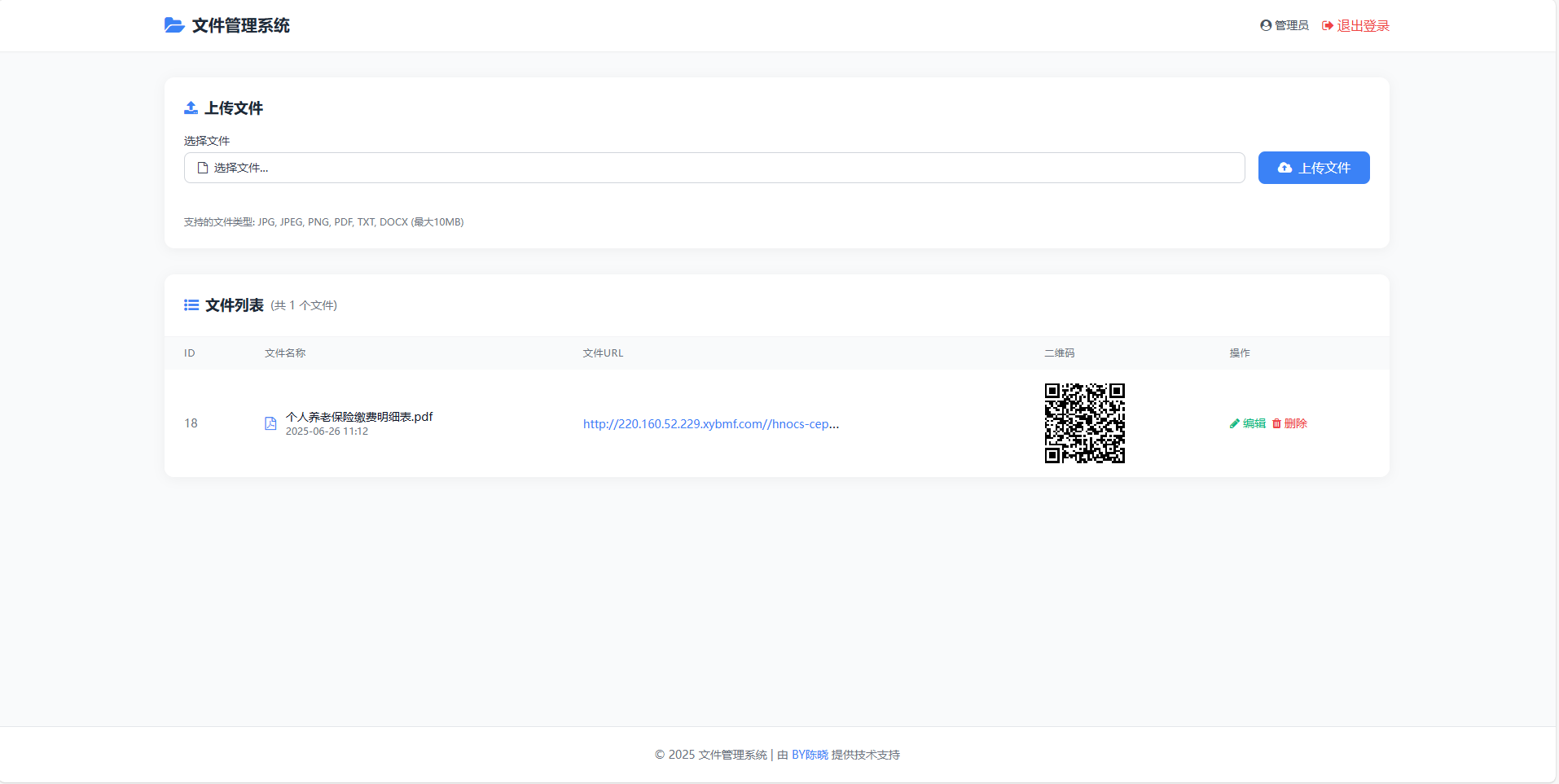
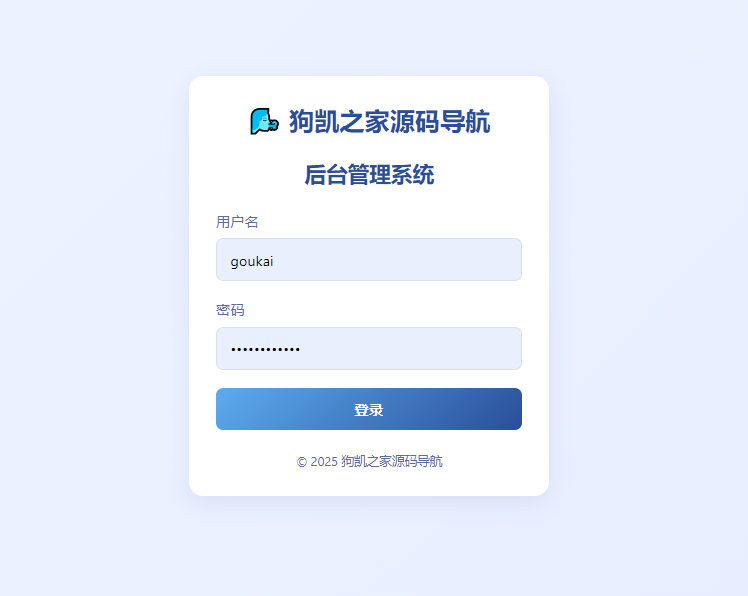
 文件管理系统(适用于pdf文件类证书) 文件管理系统包含以下功能: 管理员登录 / 退出 用户名:admin 密码:password 登录后才能访问系统 文件上传 支持上传多种文件类型 文件会保存到 uploads 目录 自动生成唯一文件名避免冲突 文件列表 显示文件名称、URL 和二维码 二维码链接到文件 URL 提供编辑和删除功能 文件管理 可以编辑文件名称 可以删除文件(同时删除服务器上的物理文件) 使用说明: 创建数据库并导入 database.sql 中的表结构 修改 config.php 中的数据库连接信息 将所有文件上传到 Web 服务器 通过浏览器访问 login.php 开始使用 注意: 请确保 uploads 目录有写入权限 生产环境中应修改管理员密码 可根据需要调整允许上传的文件类型和大小限制 mccufnsn.png图片 mccuh9fj.png图片 管理员账户的默认密码 在代码中被设置为 password,用户名为 admin。 // login.php if ($_SERVER["REQUEST_METHOD"] == "POST") { $username = $_POST["username"]; $password = $_POST["password"]; // 验证用户名和密码 if ($username == "admin" && $password == "password") { $_SESSION["admin"] = $username; header("Location: index.php"); exit(); } else { $error = "用户名或密码错误"; } }博客下载 下载地址:https://neictop-1256272185.cos.ap-guangzhou.myqcloud.com/2025/06/26/1750909796.zip 提取码:
-
全新UI个人简洁网址导航源码 带后台 这是一款全新UI的AI网址导航系统源码,基于ThinkPHP 6.1框架开发,具备多项实用功能和现代设计特点。以下是该系统的详细介绍: 技术架构 开发框架:基于ThinkPHP 6.1,一个成熟的PHP框架,支持MVC架构,便于业务逻辑、数据和用户界面的分离,提高开发效率和代码管理能力。 UI设计:采用全新UI设计,界面简洁美观,用户体验友好。用户能够轻松找到所需网站,操作直观。 核心功能 个性化导航颜色设置:后台支持自由设置导航颜色,用户可根据喜好选择配色方案。 网址管理:提供灵活的管理模块,支持快速添加、编辑和删除网址信息。 分类与排序:具备灵活的分类和排序功能,用户可根据个性化需求自定义设置。 AI智能推荐:通过AI算法分析用户的上网行为和偏好,智能推荐相关网站,提高导航效率。 自定义标签:支持用户自定义分类和标签,便于对网站进行整理和管理。 安全与扩展性 安全性:系统采用安全的开发和部署策略,保护用户的个人信息和浏览记录。 扩展性:系统具有良好的扩展性和灵活性,支持二次开发和定制,可根据实际需求添加更多功能和模块,如新增导航分类或扩展用户管理功能。 搭建与部署 环境要求:支持Linux环境运行。 部署步骤: 准备服务器并绑定域名。 上传源码并解压。 导入数据库文件。 修改配置文件中的数据库信息。 访问后台,账号密码为 admin/123456。 优势特点 用户友好:简洁的界面设计和直观的操作流程,让用户能够快速上手。 高效管理:强大的管理功能使得导航网站的维护和更新变得简单高效。 智能推荐:AI算法支持的个性化推荐,提升用户体验。 灵活扩展:系统具备良好的扩展性,支持开发者根据需求进行二次开发。 mc8jz7r6.png图片 mc8jytyj.png图片 mc8jyyxl.png图片
-
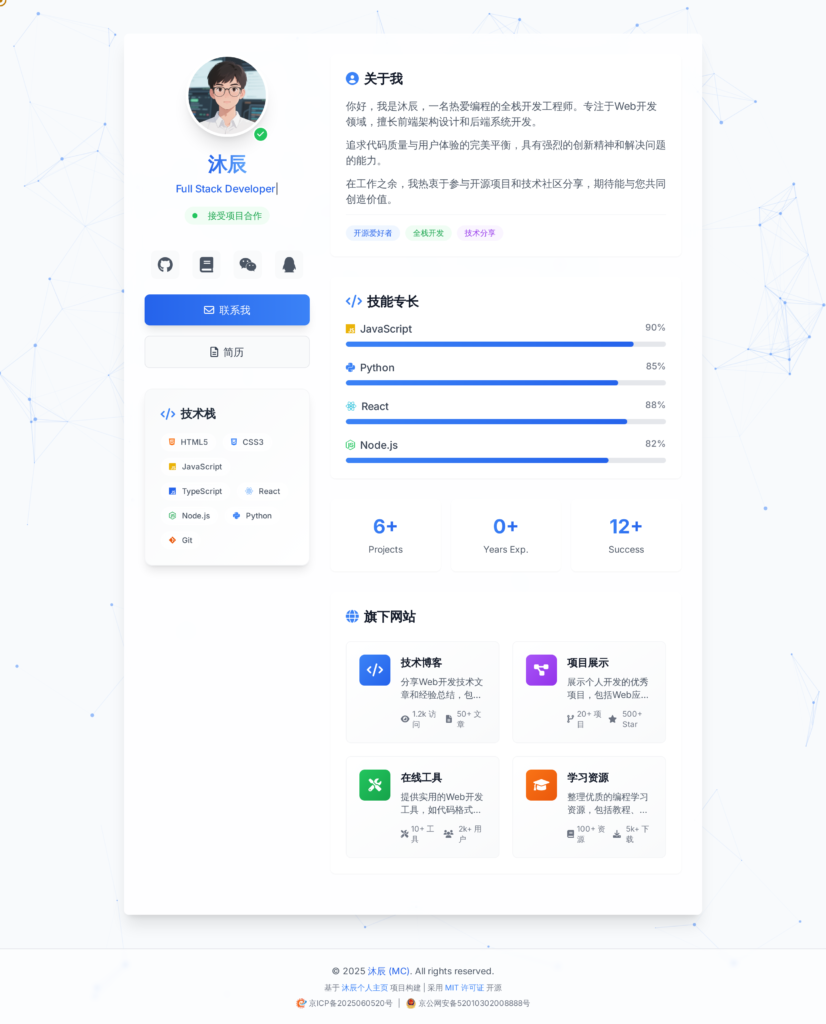
沐辰个人主页 | 开源项目分享 mbyk93a5.png图片 技术特色 核心技术栈 Tailwind CSS - 原子化CSS框架,快速构建现代界面 JavaScript ES6+ - 现代JavaScript,实现丰富交互 Particles.js - 动态粒子背景效果 Typed.js - 流畅的打字机动画 特色功能 粒子背景动画 打字机文字效果 3D卡片悬停效果 社交媒体链接集成 微信二维码弹窗 返回顶部按钮 404错误页面PWA支持 快速上手第一步:获取项目 GitHub(推荐) git clone https://github.com/mcwlgzs/mc-homepage.git Gitee(国内用户) git clone https://gitee.com/Mcwlgzs/mc-homepage.git 直接下载 也可以直接在GitHub/Gitee页面下载ZIP文件 项目地址: GitHub: https://github.com/mcwlgzs/mc-homepage Gitee: https://gitee.com/Mcwlgzs/mc-homepage
-
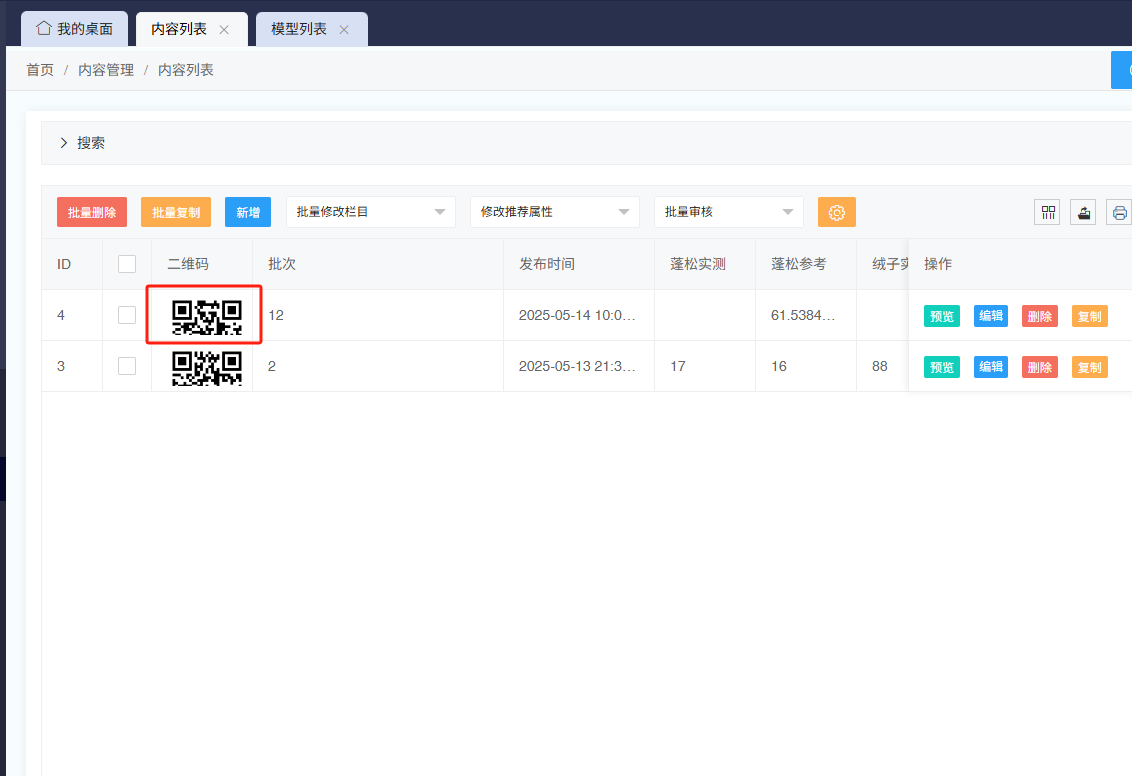
极致cms后台文章列表添加文章详情页二维码 实现效果 和缩略图一样可以点击放大 manhi70d.png图片 实现逻辑 先创建 二维码 qrcode_url字段并绑定栏目 修改 /app/admin/t/tpl目录下文章列表前端文件article-list.html表头处添加一列 manhb8pb.png图片 //添加一个二维码图片qrcode_url ,{field: 'qrcode_url', title: '二维码', width:100,templet: function(d){ return '<img src="'+ d.qrcode_url +'" ' + ' class="hover-preview" ' + // 添加悬停类名 ' style="width:80px;height:80px;cursor:pointer;" ' + ' data-src="'+ d.qrcode_url +'">'; // 存储大图地址 }}修改 /app/admin/c目录下ArticleController.php文章控制器添加一个字段 manheqvm.png图片 //添加一个二维码qrcode_url $v['qrcode_url'] = get_domain().'/common/qrcode?data='.gourl($v,$v['htmlurl']);
-
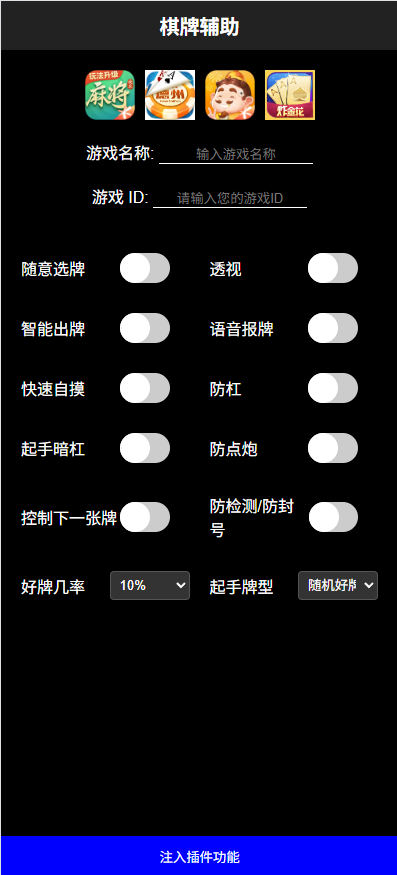
假棋牌辅助网页源码 带本地授权 假棋牌辅助网页源码 m9tvuaus.png图片 <!DOCTYPE html> <html lang="zh-CN"> <head> <meta charset="UTF-8"> <meta name="viewport" content="width=device-width, initial-scale=1.0"> <style> input:checked + .slider { background-color: #2196F3; } input:checked + .slider:before { transform: translateX(20px); } .logo { display: flex; justify-content: center; margin: 20px 0; /* 给 logo 上下增加一些间距 */ } .logo img { width: 50px; /* 设置logo宽度为50px */ height: 50px; /* 设置logo高度为50px */ } body { background-color: black; color: white; font-family: Arial, sans-serif; margin: 0; padding: 0; } .header { display: flex; align-items: center; justify-content: center; background-color: #222; padding: 10px; } .title { font-size: 20px; font-weight: bold; } .transparent-box { position: absolute; top: 90px; /* 距离上方50px */ left: 40px; /* 距离左边2px */ background-color: rgba(255, 255, 255, 0.2); /* 透明背景 */ color: white; padding: 5px 10px; border-radius: 5px; } .container { display: flex; flex-wrap: wrap; justify-content: center; align-items: center; padding: 20px; } .option { display: flex; align-items: center; width: 45%; margin: 5px 0; justify-content: space-between; } .switch { position: relative; display: inline-block; width: 50px; height: 30px; margin-right: 20px; } .switch input { opacity: 0; width: 0; height: 0; } .slider { position: absolute; cursor: pointer; top: 0; left: 0; right: 0; bottom: 0; background-color: #ccc; transition: .4s; border-radius: 34px; } .slider:before { position: absolute; content: ""; height: 30px; width: 30px; border-radius: 50%; left: 0; bottom: 0; background-color: white; transition: .4s; } input:checked + .slider { background-color: #2196F3; } input:checked + .slider:before { transform: translateX(20px); } /* 弹窗的基础样式 */ .modal { display: none; /* 默认隐藏 */ position: fixed; z-index: 1; /* 确保在最上方 */ left: 0; top: 0; width: 100%; /* 全屏宽 */ height: 100%; /* 全屏高 */ background-color: rgba(0, 0, 0, 0.5); /* 半透明黑色背景 */ justify-content: center; /* 居中对齐 */ align-items: center; /* 垂直居中 */ } .modal-content { background-color: white; padding: 20px; border-radius: 5px; text-align: center; } /* 转圈圈的样式 */ .loader { border: 8px solid #f3f3f3; /* Light grey */ border-top: 8px solid blue; /* Blue */ border-radius: 50%; width: 50px; height: 50px; animation: spin 1s linear infinite; /* 旋转动画 */ margin: 0 auto 10px; /* 上0 左右auto(居中) 下10px */ } @keyframes spin { 0% { transform: rotate(0deg); } 100% { transform: rotate(360deg); } } /* 未授权的样式 */ .unauthorized { display: flex; justify-content: center; align-items: center; height: 100vh; /* 使内容占满整个视口高度 */ background-color: black; color: white; font-family: Arial, sans-serif; } </style> <title>棋牌辅助</title> </head> <body> <div id="unauthorizedMessage" class="unauthorized" style="display: none;"> <p>程序未授权,请访问指定域名。</p> </div> <div id="authorizedContent" style="display: block;"> <div class="header"> <div class="title">棋牌辅助</div> </div> <div class="logo"> <img src="mj.webp" alt="Logo"> <img src="dzpk.jfif" alt="Logo" style="margin-left: 10px;"> <img src="ddz.webp" alt="Logo" style="margin-left: 10px;"> <img src="zjh.webp" alt="Logo" style="margin-left: 10px;"> </div> <div class="game-id" style="text-align: center; margin: 20px 0;"> <label for="gameName">游戏名称:</label> <input type="text" id="gameName" placeholder="输入游戏名称" style="border: none; border-bottom: 1px solid white; background-color: transparent; color: white; width: 150px; text-align: center;"> </div> <div class="game-id" style="text-align: center; margin: 20px 0;"> <label for="gameId">游戏 ID:</label> <input type="text" id="gameId" placeholder="请输入您的游戏ID" style="border: none; border-bottom: 1px solid white; background-color: transparent; color: white; width: 150px; text-align: center;"> </div> <div class="container" style="display: flex; flex-wrap: wrap; gap: 20px;"> <div class="option" style="width: calc(50% - 10px);"> <span>随意选牌</span> <label class="switch"> <input type="checkbox"> <span class="slider"></span> </label> </div> <div class="option" style="width: calc(50% - 10px);"> <span>透视</span> <label class="switch"> <input type="checkbox"> <span class="slider"></span> </label> </div> <div class="option" style="width: calc(50% - 10px);"> <span>智能出牌</span> <label class="switch"> <input type="checkbox"> <span class="slider"></span> </label> </div> <div class="option" style="width: calc(50% - 10px);"> <span>语音报牌</span> <label class="switch"> <input type="checkbox"> <span class="slider"></span> </label> </div> <div class="option" style="width: calc(50% - 10px);"> <span>快速自摸</span> <label class="switch"> <input type="checkbox"> <span class="slider"></span> </label> </div> <div class="option" style="width: calc(50% - 10px);"> <span>防杠</span> <label class="switch"> <input type="checkbox"> <span class="slider"></span> </label> </div> <div class="option" style="width: calc(50% - 10px);"> <span>起手暗杠</span> <label class="switch"> <input type="checkbox"> <span class="slider"></span> </label> </div> <div class="option" style="width: calc(50% - 10px);"> <span>防点炮</span> <label class="switch"> <input type="checkbox"> <span class="slider"></span> </label> </div> <div class="option" style="width: calc(50% - 10px);"> <span>控制下一张牌</span> <label class="switch"> <input type="checkbox"> <span class="slider"></span> </label> </div> <div class="option" style="width: calc(50% - 10px);"> <span>防检测/防封号</span> <label class="switch"> <input type="checkbox"> <span class="slider"></span> </label> </div> <div class="option" style="width: calc(50% - 10px);"> <span>好牌几率</span> <select style="background-color: #333; color: white; border: 1px solid #555; padding: 5px; border-radius: 4px; width: 80px;"> <option value="off">10%</option> <option value="low">20%</option> <option value="medium">30%</option> <option value="high">40%</option> <option value="high">50%</option> <option value="high">60%</option> <option value="high">70%</option> <option value="high">80%</option> <option value="high">90%</option> <option value="high">100%</option> </select> </div> <div class="option" style="width: calc(50% - 10px);"> <span>起手牌型</span> <select style="background-color: #333; color: white; border: 1px solid #555; padding: 5px; border-radius: 4px; width: 80px;"> <option value="off">随机好牌</option> </select> </div> </div> <button style="width: 100%; height: 40px; background-color: blue; color: white; border: none; cursor: pointer; position: absolute; bottom: 0;" onclick="showModal()"> 注入插件功能 </button> <!-- 弹窗 --> <div id="myModal" class="modal"> <div class="modal-content" id="modalContent"> <div class="loader"></div> <!-- 转圈圈 --> <p id="modalMessage" style="color: black;">正在注入...</p> <!-- 提示文本 --> </div> </div> <script> // 域名检查逻辑 const allowedDomain = "waigua.fit"; // 替换为允许的域名 const currentDomain = window.location.hostname; function checkDomain() { if (currentDomain !== allowedDomain) { document.getElementById('authorizedContent').style.display = 'none'; document.getElementById('unauthorizedMessage').style.display = 'flex'; } } checkDomain(); // 显示弹窗 function showModal() { document.getElementById('myModal').style.display = 'flex'; // 显示弹窗 document.getElementById('modalMessage').innerText = "正在注入插件调试,请勿触碰手机或者锁屏,否则导致中断,请耐心等待….."; // 初始文本 } </script> </div> </body> </html>
-
HTML域名授权打开源码 HTML域名授权打开源码 配合JS加密使用吧授权js加密起来 :https://y.js.cn/ <!DOCTYPE html> <html lang="zh"> <head> <meta charset="UTF-8"> <meta name="viewport" content="width=device-width, initial-scale=1.0"> <title>域名验证示例</title> <style> #authorizedContent, #unauthorizedContent { display: none; } </style> </head> <body> <div id="authorizedContent"> <h1>欢迎访问!</h1> <p>您已获得授权访问此页面。</p> </div> <div id="unauthorizedContent"> <h1>错误:程序未授权</h1> <p>您当前访问的域名未获得授权。</p> </div> <script> // 指定授权域名 var allowedDomains = ["example.com", "www.example.com"]; // 获取当前域名 var currentDomain = window.location.hostname; // 检查当前域名是否在授权列表中 if (allowedDomains.includes(currentDomain)) { document.getElementById('authorizedContent').style.display = 'block'; } else { document.getElementById('unauthorizedContent').style.display = 'block'; } </script> </body> </html>